How I went from repeating instructions every conversation to having AI that actually understands my codebase
Let me ask you a few questions:
- 😤 Are you frustrated with AI giving inconsistent results?
- 🔁 Do you find yourself repeating the same instructions over and over?
- 🤔 Do you wish AI just knew your project better?
If you answered yes to any of these, you're not alone. And here's the thing—it's not the AI's fault. It's how we're feeding it information.
I spent months fighting with AI assistants, carefully crafting prompts, only to get generic code that didn't follow our architecture. Then I discovered context engineering, and everything changed.
🎯 The Fundamental Distinction: Prompt Engineering vs. Context Engineering
Most developers focus on prompt engineering—crafting the perfect question to get the right answer. But there's a more powerful approach.
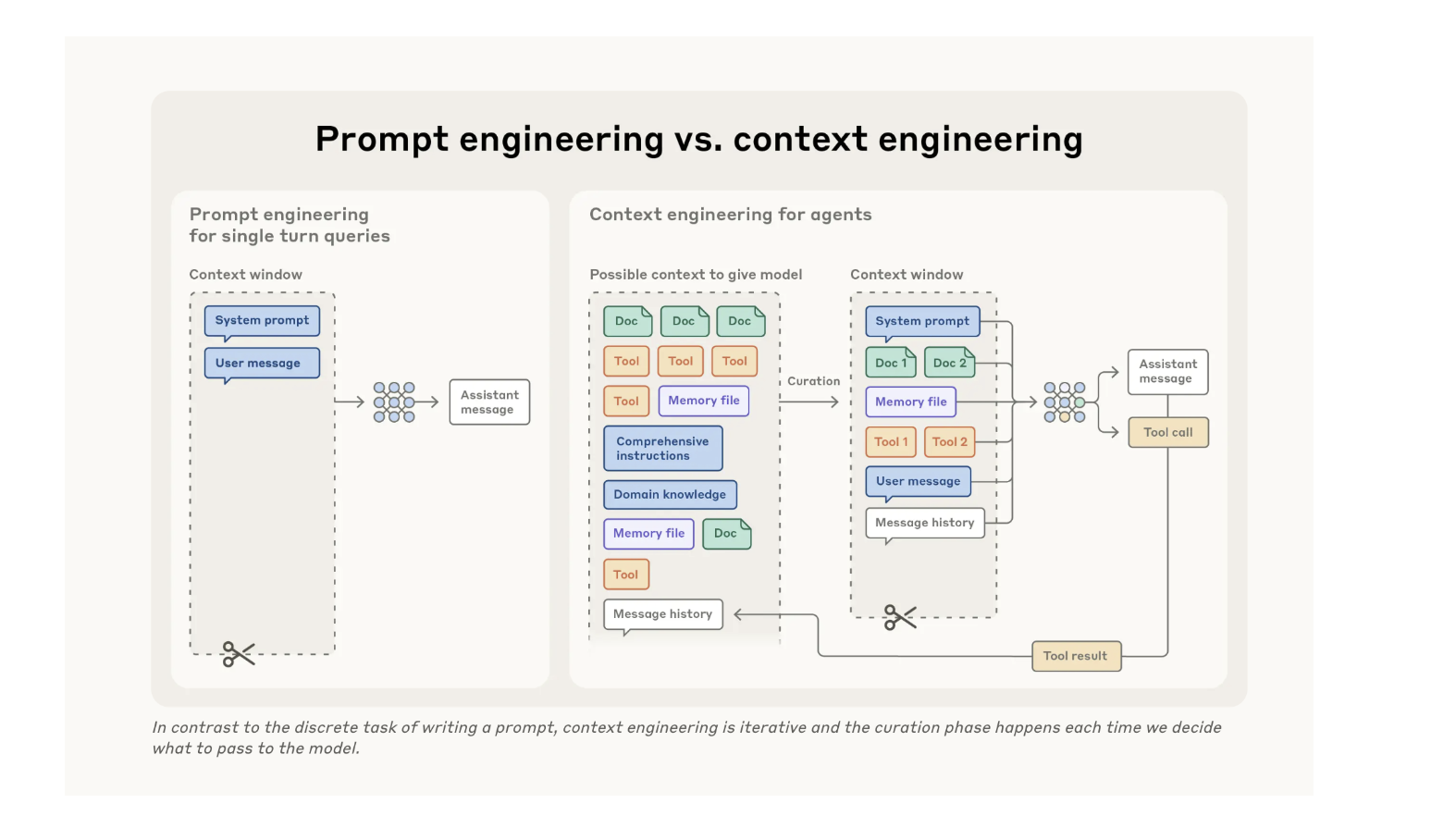
| Prompt Engineering | Context Engineering | |
|---|---|---|
| 🔍 Focus | Individual queries | Information environment |
| 📋 Scope | One-off instructions | Persistent knowledge base |
| ⚡ Effort | Manual and repetitive | Automated and consistent |
| 📖 Analogy | Telling a story each time | Building a library |
| 📈 Impact | Short-term results | Long-term productivity |
Here's the key insight:
💡 Prompt engineering is fighting the AI each time. Context engineering is teaching the AI once.
Think about onboarding a new developer. You don't explain your coding standards every time they write a function. You point them to documentation, show them examples, and let them absorb the patterns. Context engineering does the same thing for AI.
🧠 Understanding Context Windows: The Hybrid Model
Every AI has a context window—its working memory. Claude 3.5 Sonnet has 200,000 tokens (roughly 150,000 words). That sounds like a lot, but it's finite and precious, like RAM in a computer.
The challenge: you can't include everything. So you need to be strategic.
The solution is a hybrid approach:
┌──────────────────────────────┐
│  ⬆️  UPFRONT CONTEXT         │
│  • Standards & conventions   │
│  • Architecture patterns     │
│  • Team workflows            │
├──────────────────────────────┤
│  ⚡ JUST-IN-TIME             │
│  • File contents (tools)     │
│  • External docs (MCPs)      │
│  • Real-time data (APIs)     │
└──────────────────────────────┘
🎯 The principle is simple: Give agents the RIGHT information at the RIGHT time, not ALL information ALL the time.
Your project structure itself becomes a signal. Folder hierarchy teaches purpose. Naming conventions show role. Even timestamps signal patterns. A well-organized codebase is already teaching the AI.
✨ The Power of Context: A Real Example
Let me show you what this looks like in practice.
❌ Without Context Engineering
Request: "Create a new user management API endpoint"
Result:
from flask import jsonify
from models import User

@app.route('/api/users', methods=['GET'])
def get_users():
    users = User.query.all()
    return jsonify([u.__dict__ for u in users])
The problems? Direct database access in the route, no service layer, no validation, exposes ORM objects directly, no error handling, no tests. It's generic code that doesn't follow your architecture.
✅ With Context Engineering
Same request: "Create a new user management API endpoint"
Result:
# src/api/routes/users.py
from fastapi import APIRouter, Depends
from src.application.users.queries import GetUsersQuery
from src.application.users.schemas import UserListResponse

router = APIRouter(prefix="/api/users", tags=["users"])

@router.get("/", response_model=UserListResponse)
async def get_users(query: GetUsersQuery = Depends()):
    return await query.execute()

# src/application/users/queries.py
class GetUsersQuery:
    def __init__(self, user_service: UserService = Depends()):
        self.user_service = user_service

    async def execute(self) -> UserListResponse:
        users = await self.user_service.get_all()
        return UserListResponse(users=[UserDTO.from_entity(u) for u in users])
⏱️ Time saved: 30-60 minutes per feature.
The AI didn't get smarter. It just had the right context.
🏛️ The Four Pillars of Context Engineering
I've distilled context engineering into four pillars. Each serves a distinct purpose, and together they create an environment where AI becomes a true collaborator.
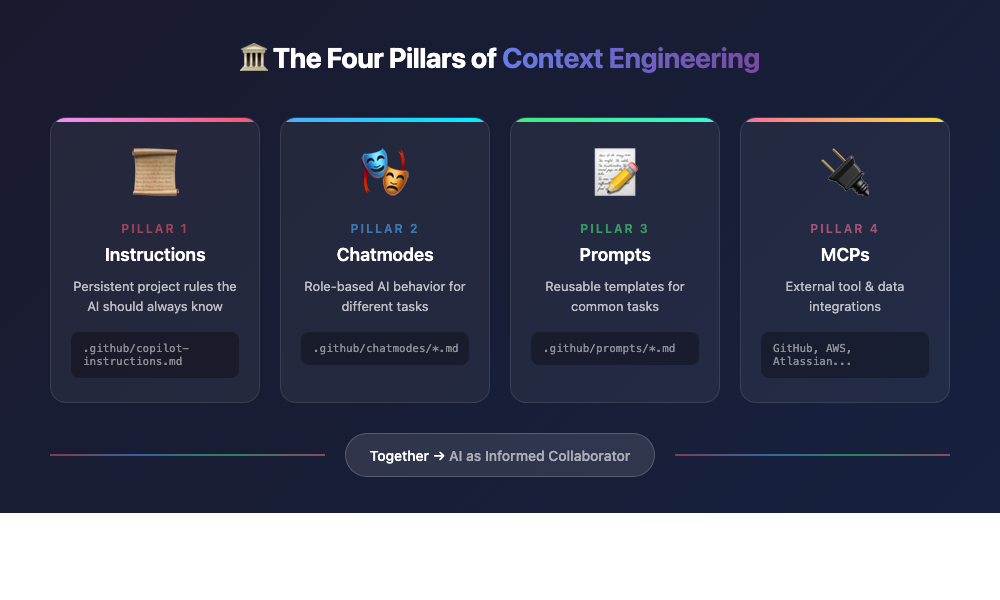
📜 Pillar 1: Instructions
Purpose: Project-wide persistent rules that the AI should always know.
.github/
  copilot-instructions.md
  instructions/
    typescript.instructions.md
    react.instructions.md
    testing.instructions.md
This is where you document:
- ✅ Coding standards and conventions
- ✅ Architecture patterns your team follows
- ✅ Testing requirements
- ✅ Common pitfalls to avoid
📚 Think of instructions as the "employee handbook" for your AI assistant.
🎭 Pillar 2: Chatmodes (Personas)
Purpose: Role-based AI behavior for different tasks.
.github/chatmodes/
  principal-engineer.chatmode.md
  code-reviewer.chatmode.md
  test-engineer.chatmode.md
Example chatmode:
---
description: 'Thorough code reviewer'
tools: ['editFiles', 'search']
---
# Code Reviewer Mode

## Review Criteria
- Code quality and readability
- Performance implications
- Security vulnerabilities
- Test coverage
Different tasks need different mindsets. A code reviewer thinks differently than someone implementing a feature. Chatmodes let you switch the AI's perspective.
📝 Pillar 3: Prompts
Purpose: Standardize common tasks into reusable templates.
.github/prompts/
  create-api-endpoint.prompt.md
  write-unit-tests.prompt.md
  refactor-component.prompt.md
Example prompt:
---
mode: 'agent'
description: 'Create REST API endpoint'
---
# Create API Endpoint
1. Route handler in src/routes/
2. Service layer in src/services/
3. Add types in src/types/
4. Unit + integration tests
5. Update API docs
Prompts ensure consistency. Every API endpoint follows the same structure. Every test file uses the same patterns. No more variation based on how you phrase the request.
🔌 Pillar 4: MCPs (Model Context Protocol)
Purpose: Connect AI to external tools and authoritative sources.
Popular MCPs include:
- 🐙 GitHub → Repository data, PRs, issues
- ☁️ AWS → Well-Architected Framework, best practices
- 📋 Atlassian → Jira tickets, Confluence documentation
- 🐘 PostgreSQL → Direct database queries
- 📚 Context7 → Up-to-date library documentation
🔑 The key advantage: Instead of copying documentation into your prompt (which gets stale), MCPs give AI direct access to authoritative, always-current sources.
📖 A Real-World Story: The Docker Challenge
Let me share how these four pillars came together for a real task.
🎯 The Challenge
I needed to document a business case for Docker hardened images across our infrastructure. The requirements:
- 🔧 Technical depth for engineers
- 💼 Business justification for leadership
- ☁️ Alignment with AWS Well-Architected Framework
- 📄 Delivered in Confluence
- ⏰ Timeline: 2-3 days
😓 The Traditional Approach
Day 1: Research (6-8 hours)
Day 2: Draft document (6-8 hours)
Day 3: Format and publish (4-6 hours)
────────────────────────────────
Total: 16-22 hours 😱
Plus 15-20 context switches, manual copy-paste between tools, and the inevitable documentation drift.
🚀 The Context Engineering Approach
My setup:
- 🎭 Chatmode: Principal Engineer (strategic thinking, architectural focus)
- 📜 Instructions: Business case template with our standard structure
- 🔌 MCPs: AWS Knowledge Base, Atlassian integration
My single request:
"Create business case for Docker hardened images using AWS Well-Architected Framework. Publish to Confluence."
What happened:
- 🔍 Agent queried AWS MCP for framework requirements
- 📋 Structured content using my business case template
- ✍️ Generated comprehensive documentation
- 📤 Published directly to Confluence via Atlassian MCP
✨ Result: 2 days of work compressed into 4 hours of focused execution.
No context switching. No manual copy-paste. No gaps in framework coverage. Flow state maintained throughout.
🎓 Key Principles for Effective Context Engineering
Through trial and error, I've identified six principles that make context engineering work:
1️⃣ Design for Discoverability
Structure your project so both humans AND agents can navigate intuitively.
src/features/auth/
  components/  ← Purpose is clear
  services/    ← Logic lives here
  types/       ← Definitions grouped
💡 Good structure is good context.
2️⃣ Separate Persistent from Dynamic
- Persistent (upfront): Standards, patterns, workflows—things that rarely change
- Dynamic (just-in-time): File contents, external docs, real-time data—things that change frequently
Don't bloat your context window with information that should be fetched on demand.
3️⃣ Leverage Specialized Tools
Don't make AI memorize documentation. Connect it to the source.
| Before | With MCP |
|---|---|
| 📋 Paste 10,000 words of AWS docs | 🔌 "Use AWS Container Lens best practices" |
| ❌ Gets stale | ✅ Always current |
| ❌ Eats context window | ✅ Fetched on demand |
4️⃣ Iterate and Measure
Track what matters:
- ⏱️ Time saved per task
- ⭐ Quality improvements
- 🔄 Number of iterations needed
- 😊 Developer satisfaction
📊 What gets measured gets improved.
5️⃣ Show, Don't Just Tell
Few-shot prompting works. Instead of writing a laundry list of rules, provide 3-5 high-quality examples showing expected behavior.
🖼️ For AI, examples are worth a thousand words.
6️⃣ Context Compounds
Better context leads to better results. Better results help you refine context. The cycle accelerates.
     ┌─────────────┐
     │   Better    │
     │   Context   │
     └──────┬──────┘
            │
            ▼
     ┌─────────────┐
     │   Better    │
     │   Results   │
     └──────┬──────┘
            │
            ▼
     ┌─────────────┐
     │  Refined    │
     │   Context   │◄──── 🔄 The cycle continues!
     └─────────────┘
This is why the initial investment pays dividends over time.
💰 The ROI: Why This Matters
Let's talk numbers:
⏱️ Time Investment:
├─ Initial setup: 2-3 hours
├─ Weekly maintenance: 30 minutes
└─ Quarterly review: 1 hour

💵 Weekly Savings: 8-17 hours recovered

🎉 Annual ROI: 400-800 hours saved
🚀 That's 10-20 weeks of productive time returned to you every year!
But it's not just about time. It's about:
- 🎯 Consistency: Every feature follows your patterns
- ⭐ Quality: Production-ready code from the start
- 🧘 Flow: No more context switching between docs and tools
- 👥 Onboarding: New team members (human and AI) ramp up faster
🌟 The Paradigm Shift
Here's what I've come to believe:
"Context engineering represents a fundamental shift in how we build with LLMs. As models become more capable, the challenge isn't just crafting the perfect prompt—it's thoughtfully curating what information enters the model's limited attention budget at each step."
This isn't about more prompting. It's about better context.
This isn't about AI as a tool. It's about AI as an informed collaborator.
The developers who master context engineering won't just be more productive—they'll be working in a fundamentally different way. One where AI doesn't fight them, but works alongside them with full understanding of the codebase, the patterns, and the goals.
🎬 Your Next Step
Start with one instruction file. Document your coding standards. Watch how the AI's output improves.
Then iterate.
✨ The best context is the one that evolves with your team.