It's not even a technology. It's a convention. And that's exactly why it wins.
Markdown is a writing convention — a set of rules for formatting plain text that John Gruber wrote a spec for in 2004. No runtime. No SDK. No API. Just text with agreed-upon symbols that any human or machine already understands. While the AI industry has shipped transformers, vector databases, multi-agent orchestration frameworks, and billion-parameter models, Markdown has just quietly remained what it always was: the lowest common denominator of structured information.
And that turns out to be exactly what agentic context engineering needs.
I've been a Docs as Code person for years. Markdown in version control, reviewed in PRs, rendered by static site generators — it's the default format for everything I write. When I started building agentic workflows, that habit turned out to be directly valuable in a way I hadn't anticipated. The contrast isn't simple technology versus complex technology. It's a convention versus the most sophisticated AI systems ever built — and the convention wins on cost, portability, and clarity every time.
This post is about that insight — and how it played out across every stage of a real migration: upgrading five LangChain agents from 0.3 to 1.2. The migration is the example. Markdown is the point.
In this post you'll learn:
- Why Markdown is the highest-signal, most token-efficient format for AI context — and the numbers that prove it
- How Docs as Code thinking (MkDocs, Backstage, Marp) maps directly onto agentic context engineering
- Three ways to get any documentation into your context window as Markdown automatically
- How every artefact in an agentic workflow — context files, plans, reviews, progress logs — is Markdown doing its job
- Why Markdown files that survive context resets are the key to multi-day agentic tasks
💡 This is Part 5 in my Context Engineering series. Part 1 covered the four pillars. Part 2 introduced agent skills. Part 3 argued for lean over Scrum. Part 4 put skills to work with Git worktrees.
📖 Markdown as Context: Why Format Matters for AI
I've been using Markdown for years — not just as a formatting convenience, but as a philosophy. Docs as Code: documentation that lives in version control, travels with your codebase, and gets reviewed alongside your PRs. ADRs (Architectural Decision Records) capturing why a technical choice was made. RFCs proposing and debating changes before implementation. And this blog — written in Markdown, published via Ghost, specifically because Ghost keeps it simple and stays out of the way. If you've worked with MkDocs to build static documentation sites, or Backstage's TechDocs — which uses Markdown as the foundation for an entire developer portal — you already know the power of treating docs as first-class artefacts. Even presentations: Marp turns Markdown into slides, which means I can write a deck in the same format as everything else. Markdown all the way down.
So when I'm handing context to an AI agent, Markdown is the obvious format. It's not a new habit — it's the same discipline I've used for years, applied to a new domain. The difference is that with AI, the choice of format carries a measurable, direct cost.
When you're migrating across major library versions, your agent needs documentation — lots of it. Release notes, migration guides, changelogs, API references. The naïve approach is to point your agent at the docs website and let it browse. The problem: documentation websites are HTML, and HTML is expensive.
Cloudflare put some hard numbers on this recently. Their Markdown for Agents post measured a real documentation page: 16,180 tokens as HTML, 3,150 tokens as markdown. An 80% reduction.
Their framing nails it:
"Feeding raw HTML to an AI is like paying by the word to read packaging instead of the letter inside."
A simple heading like ## About Us costs 2–3 tokens in markdown. The equivalent HTML — <h2 class="section-title" id="about">About Us</h2> — runs 12–15. Every element, every wrapper div, every ARIA attribute, every script tag is a token your agent has to process without gaining any understanding of the actual content.
Markdown strips all of that. The same page in markdown: clean headings, code blocks, links. No wasted tokens. As Microsoft's MarkItDown project puts it:
"Markdown conventions are also highly token-efficient."
And LLMs don't just tolerate markdown — they're optimised for it. They were trained on vast quantities of it. Feeding your agent markdown isn't just cheaper; it's the format the model reasons about most fluently.
Context windows are finite. Every token you waste on HTML scaffolding is a token you can't use for understanding your codebase.
Getting LangChain Docs as Markdown
My first step was pulling down the LangChain release notes and migration guides as markdown — and it turns out the LangChain docs site makes this remarkably easy. Every page has a built-in "View as Markdown" option that returns the page as clean plain text, purpose-built for LLMs.
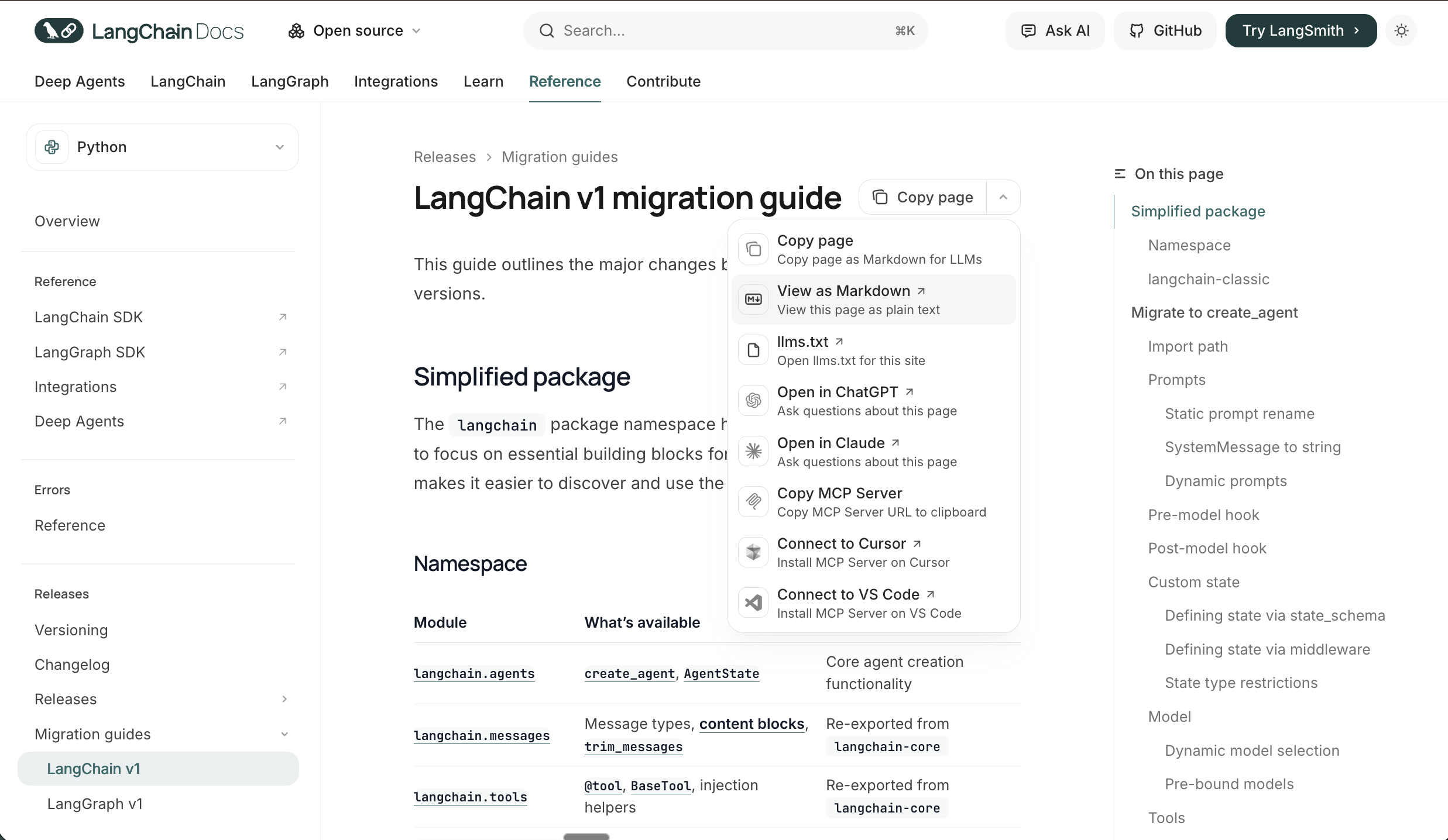
The docs site also ships with a built-in MCP server. Hit the dropdown on any page and you'll see "Copy MCP Server" — one click gives you the config to paste directly into your .mcp.json:
{
  "mcpServers": {
    "langchain-docs": {
      "type": "http",
      "url": "https://docs.langchain.com/mcp"
    }
  }
}
Add that and your agent is connected to the full LangChain docs knowledge base — searchable, queryable, without fetching a single HTML page.
This is the ecosystem catching up to how agents actually work. More documentation sites are building markdown-first, AI-native access directly into their platforms — and when they do, use it.
The Cloudflare Trick: Markdown on Demand for Everything Else
For documentation sites that don't have built-in markdown export, Cloudflare has shipped something genuinely useful. Their new Markdown for Agents feature lets any site served through Cloudflare return markdown instead of HTML — automatically, based on a single request header.
The mechanism is simple: your agent sends Accept: text/markdown in the HTTP request. Cloudflare intercepts it, converts the HTML to markdown in real time, and returns it. The response even includes an x-markdown-tokens header so you can see exactly how many tokens you're working with.
curl -H "Accept: text/markdown" https://some-docs-site.com/page
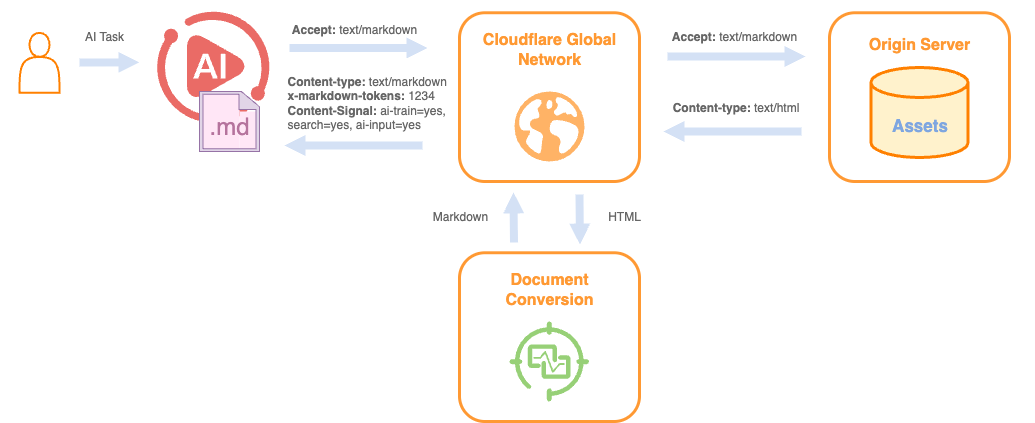
No conversion tooling required on your end. No scraping, no parsing. For any documentation that isn't LangChain — release notes, third-party libraries, framework guides — this is the most frictionless path to token-efficient context.
If you're using Claude Code, you don't need to do anything at all. I tested it: Claude Code's WebFetch tool sends Accept: text/markdown, text/html, */* as a request header automatically. Fetching the Cloudflare blog post itself returned:
content-type: text/markdown; charset=utf-8
x-markdown-tokens: 4023
content-signal: ai-train=yes, search=yes, ai-input=yes
Markdown served directly, token count included, usage permissions declared. No extra configuration. If the site is on Cloudflare and has the feature enabled, you're already getting the token savings just by using the built-in fetch tool.
MarkItDown MCP: The Fallback for Everything Else
For anything that's neither LangChain docs nor Cloudflare-hosted — PDFs, Word documents, downloaded changelogs — MarkItDown has you covered. It's Microsoft's open-source Python tool that converts virtually any file format to clean markdown: HTML, PDF, Word, Excel, PowerPoint, and more.
Crucially, it ships with an official MCP server — markitdown-mcp — so your agent can convert any file on demand without leaving the session.
pip install markitdown-mcp
Wire it into your MCP configuration and it's available immediately:
{
  "mcpServers": {
    "markitdown": {
      "command": "uvx",
      "args": ["--python", "3.13", "markitdown-mcp"]
    }
  }
}
I used this extensively throughout the migration. Whenever I hit a document that wasn't available as clean markdown — a PDF of the old API reference, a downloaded changelog, some Word doc from an internal wiki — MarkItDown MCP converted it in-session, inline, without me having to leave the conversation or run a separate script. It became the default fallback so reliably that I stopped thinking about it as a separate tool and started treating it as part of the context pipeline.
Between the three approaches — native markdown export (LangChain), Accept: text/markdown (Cloudflare), and MarkItDown MCP (everything else) — you can get any documentation into your context window in token-efficient form. The bottom line is the same in every case: your agent gets the content it needs, without the packaging it doesn't.
🗺️ Agentic Plan Mode: Building the Migration Blueprint
With the documentation loaded as markdown, the next step wasn't writing code — it was planning. This is where agentic plan mode earns its keep. And it's where you start to see that Markdown isn't just for docs fetching — it's the format of every artefact the agent produces and consumes.
Giving the Agent Codebase Context
Before entering plan mode, I made sure the agent had a solid understanding of the existing architecture via an agents.md file I maintain in the codebase. This is Docs as Code applied directly to AI context: a Markdown file, version-controlled alongside the code, that describes each of the five agents, what they do, how they relate to each other, their shared dependencies, and any known quirks.
# agents.md

## Agent Overview

This codebase contains five AI agents:

### 1. IngestAgent
Responsible for document ingestion and chunking...

### 2. RetrievalAgent
Handles vector search and context retrieval...

[etc.]
This kind of structured context file is critical. Without it, your agent has to reverse-engineer the architecture from code — which it can do, but it wastes time and tokens, and the inferences can be wrong. agents.md gives the agent ground truth about intent, not just implementation. It's also readable by humans, diffable in git, and costs a fraction of what an equivalent HTML document would. Markdown doing exactly what Markdown does best.
The Plan Mode Conversation
With the migration guides loaded as markdown and the codebase context established, I entered plan mode and walked through the migration with the agent. This wasn't just "here's what needs to change" — it was a structured conversation:
- What are the breaking changes between 0.3 and 1.2 that affect each agent?
- What's the safest migration order given agent dependencies?
- Where are the highest-risk changes?
- What backwards compatibility concerns do we need to manage?
Plan mode keeps the agent in a reasoning-and-documenting state rather than immediately writing code. The output was a plan.md — a structured, step-by-step migration plan covering each agent, the specific changes required, the order of operations, and the testing checkpoints.
This is the Markdown flywheel in action: you fed the agent Markdown documentation, and it produced a Markdown plan. The format flows through the entire pipeline. And because it's plain text in a file, it's reviewable, editable, and — crucially — portable to the next step.
🔬 The Principal Engineer Review
Here's the move that changed the quality of my migrations: before implementing anything, I spin up a sub-agent with a fresh context window to review the plan.
Why a Separate Context Window Matters
When you've been in a planning session for an hour, your agent has accumulated context — your assumptions, your framings, the reasoning path you took to arrive at the plan. That accumulated context can be a blind spot. The agent is unlikely to challenge the premises it helped establish.
A sub-agent starts fresh. It has no memory of the planning conversation. When you hand it the plan as a Markdown document and ask it to critique, it reads it the way a new engineer would read it — without the benefit of your shared assumptions, but also without the baggage of them.
This is where the portability of Markdown pays off directly. plan.md is a self-contained artefact. No conversation state, no special format — just a text file you paste in. The sub-agent gets everything it needs from the document itself.
I use a "principal engineer" sub-agent persona for this: an experienced, sceptical reviewer whose job is to find problems. The prompt is straightforward:
You are a principal engineer reviewing a migration plan.
Your job is to find problems, not validate assumptions.
Review the following plan and identify:

1. Edge cases not accounted for
2. Performance implications
3. Backwards compatibility risks
4. Missing rollback steps
5. Anything that seems underspecified or optimistic
Then I paste in plan.md as the sole input.
What It Catches
It found areas to improve — which is exactly what you want. A fresh context window will always see things the planning session normalised, and because the plan lives in a Markdown file, handing it over is as simple as pasting the document in.
📋 Progress Tracking Across Days
Large migrations rarely happen in one sitting. I worked on this across several days in whatever time I had — and I was running it using the Git worktree agent skill from Part 4, which keeps the migration isolated in its own branch while other work continues in parallel. That introduced a new problem: how does the agent pick up where it left off across sessions?
The progress.md Pattern
This is Docs as Code for agent state. Inspired by the note-taking patterns used in deep agent frameworks, I gave the agent a progress.md file to maintain alongside plan.md. The format is simple — the example below is illustrative, not the exact steps from my migration:
# Migration Progress

## Status: In Progress

## Completed
- [x] IngestAgent — LangChain imports updated
- [x] IngestAgent — Chain interface migrated to new API
- [x] IngestAgent — Tests passing

## In Progress
- [ ] RetrievalAgent — Updating retriever interface

## Pending
- [ ] RetrievalAgent — Memory migration
- [ ] SummaryAgent
- [ ] RouterAgent
- [ ] OutputAgent

## Notes
- Remember: shared utility in utils/chains.py updated once in IngestAgent step — do NOT repeat
- Existing memory objects in DB need migration script before deploying RetrievalAgent
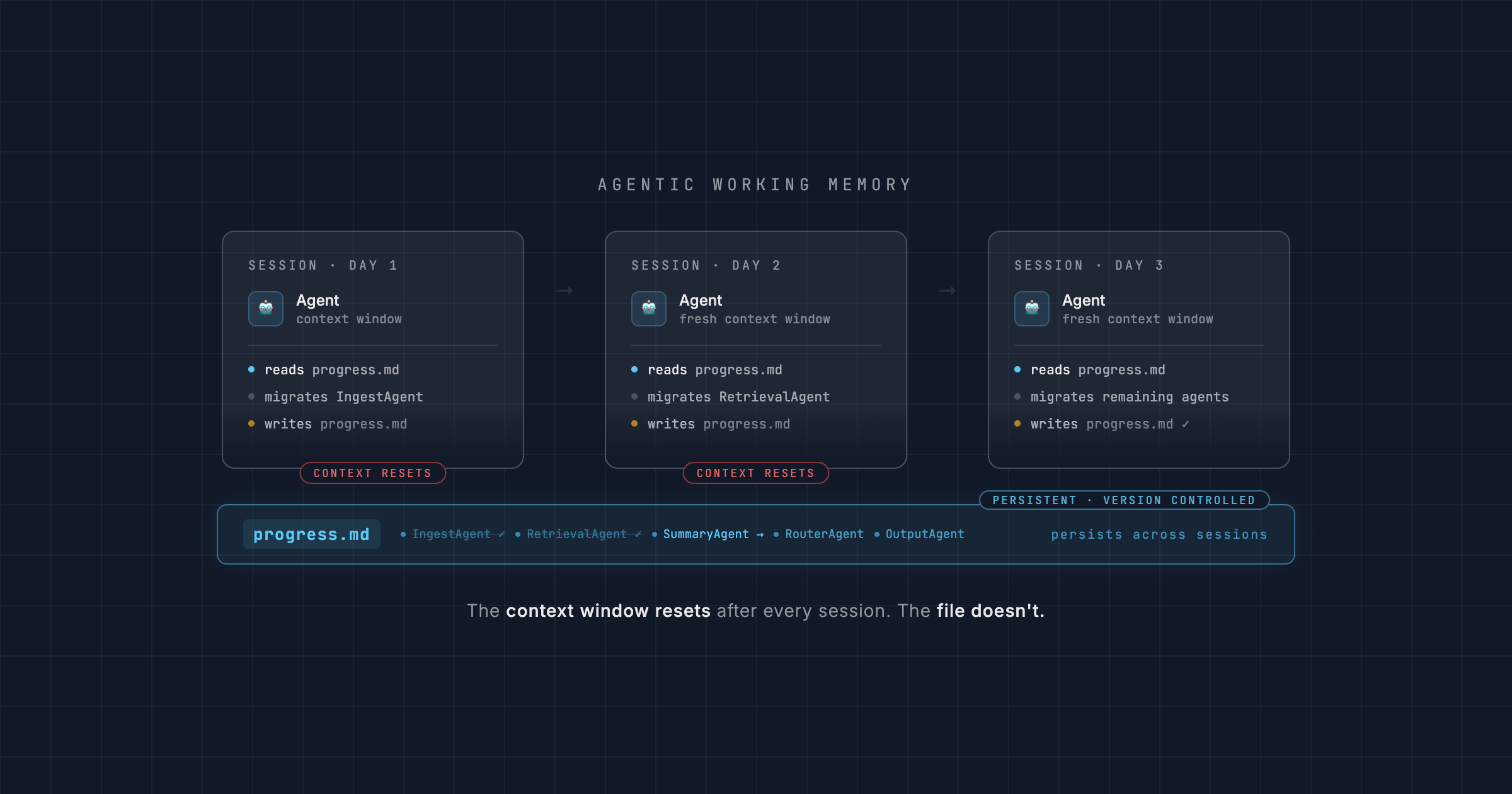
At the start of each session, the agent reads progress.md to understand current state. As it completes steps, it updates the file. It also cross-references plan.md to ensure it stays on the planned path rather than improvising.
This is low-tech but extraordinarily effective. The agent doesn't need to re-understand the entire codebase at the start of each session — it reads its own notes and picks up exactly where it left off. The context window investment at the start of each session stays small. And it's version-controlled, human-readable, and costs almost nothing in tokens to load.
💡 Think of
progress.mdas your agent's working memory that persists across sessions. The context window resets; the file doesn't. This is the Docs as Code principle applied to agent state: if it matters, write it down in Markdown and commit it.
🎯 Key Takeaways
Agentic workflows feel complex until you notice the common thread running through every step: it's all Markdown. The documentation you load, the context files you maintain, the plans you generate, the reviews you pass between agents, the state you persist across sessions — Markdown all the way down. Here's what that looks like in practice:
- 📄 Markdown is 80% cheaper than HTML. Cloudflare measured this on a real documentation page: 16,180 tokens as HTML, 3,150 as Markdown. LangChain docs has native Markdown export and a built-in MCP server. Use
Accept: text/markdownfor Cloudflare-hosted sites. Use MarkItDown MCP for everything else. Every token you save on packaging is a token your agent can spend on your codebase. - 📝 Your context files are Markdown too.
agents.mdgave the agent ground truth about the codebase architecture. It's version-controlled, human-readable, and token-efficient. Docs as Code isn't just for documentation sites — it's for everything you want your agent to know. - 🗺️ Plans are Markdown artefacts. Agentic plan mode produces a
plan.mdyou can read, edit, and hand to a sub-agent. The format flows through the entire pipeline: Markdown in, Markdown out. - 🔬 Markdown makes context portable across agents. The principal engineer review works because
plan.mdis a self-contained document. No conversation state, no special format — just a text file passed to a fresh context window. A fresh context window is a fundamentally different perspective; it catches what your planning session normalised. - 📋
progress.mdis your agent's external memory. The context window resets; the file doesn't. Markdown state files let your agent pick up exactly where it left off across sessions, across days, across whatever interruptions real work involves.
The entire migration — five agents, a major version jump, breaking changes throughout — completed successfully. But the bigger insight isn't about LangChain. It's that Markdown, treated as a first-class engineering artefact, is what makes complex agentic workflows tractable. Token-efficient context in, structured context out. The format does more work than you'd expect.
Enjoyed this? The full Context Engineering series: